Sending cryptocurrency via a QR code is a fast and convenient way to pass the recipient’s address without manually typing long strings. For beginners, this reduces typo-related errors, and for experienced users it saves time—especially during fiat-to-crypto exchanges, when using USDT exchangers, or when making frequent transfers between personal wallets. At the same time, QR codes do not replace basic security checks: the wrong network, address substitution, or an overly low on-chain fee can lead to delays or losses, even when you rely on top crypto exchangers.
What a QR code is in crypto payments and how it works
In crypto payments, a QR code is a machine-readable format that contains the recipient’s wallet address and sometimes additional parameters such as amount, network, or a payment URI. When you scan the code with your wallet camera, the address is filled in automatically, reducing the risk of character mistakes. For users performing fiat-to-crypto exchanges or interacting with USDT exchangers, QR codes are often displayed on the order page to speed up sending funds.
It is important to understand that a QR code itself does not guarantee safety. It is only a data carrier. Always verify the network, the first and last characters of the address, the fee level, and confirmation requirements. This is how reliable crypto exchangers operate and how top crypto exchangers expect users to behave.
Preparation before sending: what to check in advance
- Network: ensure the selected network matches the recipient’s network (critical for USDT exchangers).
- Address: even after scanning, compare the first and last 4–6 characters.
- Fees: low exchange fees do not replace on-chain network fees; too low a fee can delay confirmation.
- Amount: start with a test amount if it is your first transfer.
- Limits and confirmations: check how many confirmations the service requires (a common practice among top crypto exchangers).
Step by step: how to transfer crypto via QR code
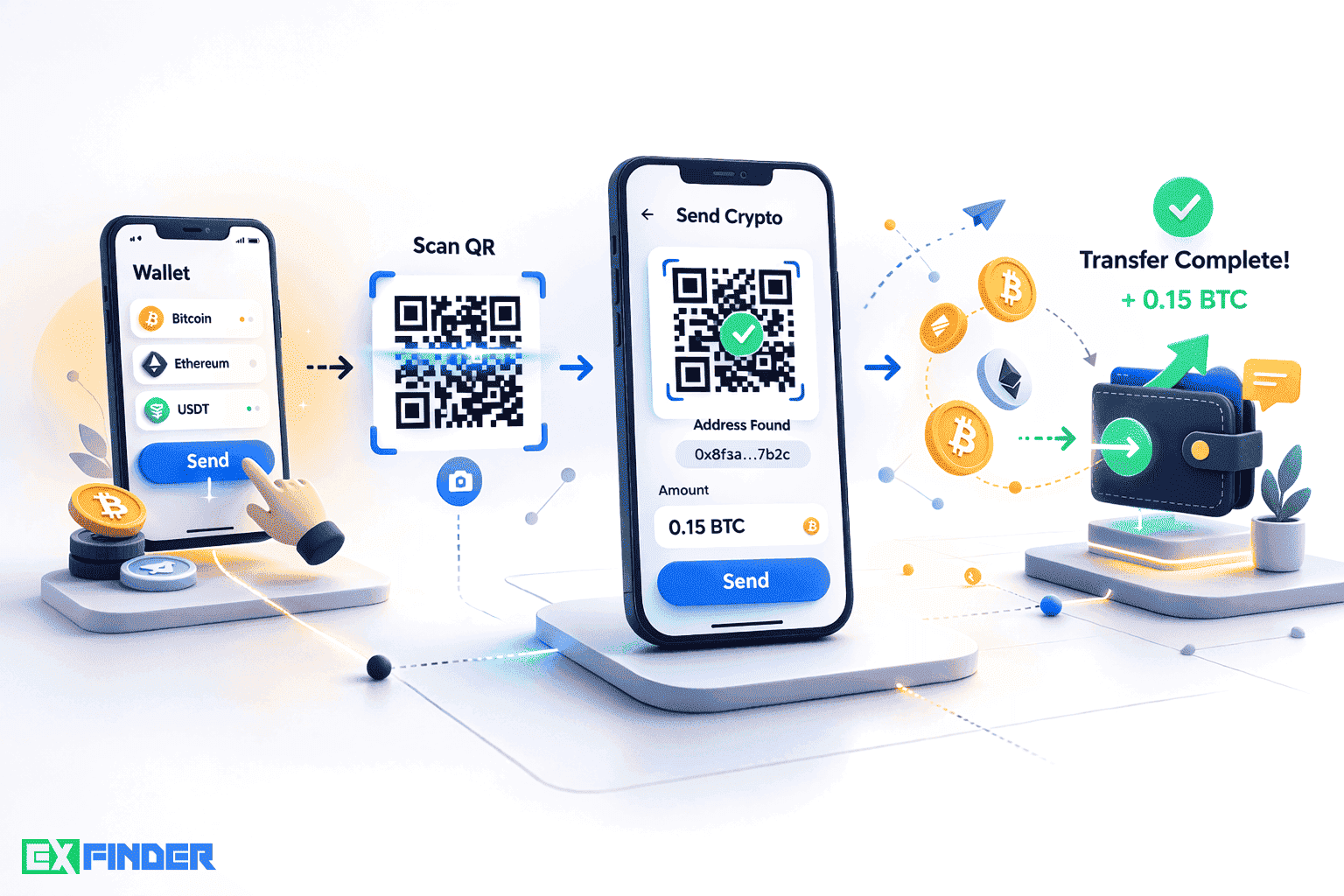
Step 1. Open the send screen in your wallet
In most wallets, the “Send” button opens a form with a QR scanner. Make sure the selected asset and network match the recipient’s request.
Step 2. Scan the recipient’s QR code
Point your camera at the QR code. The address will be filled automatically. If the code includes an amount, confirm it matches your intent (sometimes it is safer to enter the amount manually).
Step 3. Verify the network and address
Double-check the network (especially for USDT) and the first/last characters of the address. This basic safety step is standard among reliable crypto exchangers.
Step 4. Choose an appropriate fee
Consider current network congestion. If you need speed, avoid the minimum fee. When performing a fiat-to-crypto exchange and expecting fast crediting, an underpriced on-chain fee can cause delays.
Step 5. Confirm and broadcast the transaction
Sign and broadcast the transaction in your wallet. Save the TXID to track status later. This matters when comparing the best crypto exchanger by speed and transparency.
Common mistakes and how to avoid them
- Wrong network: the most frequent error with USDT. Always match the network.
- QR code substitution: scan codes only from trusted pages; beware of phishing.
- Too low fee: can leave your transaction pending in the mempool.
- No test transfer: send a small amount first for new routes.
- Rushing: especially when searching where to buy Bitcoin profitably—double-check details.
How exchangers work and why QR codes simplify the flow
During fiat-to-crypto or cross-crypto exchanges, a service creates an order and provides a payment address. QR codes speed up address entry and reduce typos. For USDT exchangers, the QR code is often embedded on the order page together with the required network. Reliable crypto exchangers also display confirmation requirements and provide a TXID after funds are sent.
Comparing address input methods
| Method | Error risk | Speed | Convenience | Recommendations |
|---|---|---|---|---|
| QR code | Low (with network checks) | High | Very convenient | Verify network and address characters |
| Copy-paste | Medium (clipboard hijacking) | High | Convenient | Re-check characters; watch browser extensions |
| Manual entry | High | Low | Inconvenient | Avoid for long addresses |
Pros and cons of QR-based transfers
Pros
- Fewer address typos.
- Faster execution.
- Convenient for mobile wallets.
- Well-suited for recurring flows with USDT exchangers.
Cons
- QR substitution risk on phishing pages.
- Does not remove the need to verify networks.
- QRs may encode amounts that you should review.
How to choose a reliable exchanger for QR transfers
- Ensure the service clearly states the required network for each route.
- Check domain history and user reviews.
- Assess fee transparency and confirmation requirements.
- Start with test amounts.
- Compare top crypto exchangers not only by rate but also by speed and support.
- Remember: the best crypto exchanger balances rates, speed, and security.
Security tips for QR transfers
- Scan QR codes only from trusted pages and your own bookmarks.
- Always verify the network and address characters after scanning.
- Do not rush when deciding where to buy Bitcoin profitably.
- Keep the TXID to track confirmation status.
- Use hardware wallets for large balances.
- Keep your wallet app and OS updated.
FAQ
Is it safe to use QR codes for transfers?
Yes, if you verify the network and address after scanning and avoid phishing pages. QR codes reduce typos but do not replace detail checks.
What if I sent funds on the wrong network?
In most cases, funds are lost or require complex recovery with the recipient’s cooperation. Always verify the network, especially for USDT exchangers.
Can I change the fee after sending?
It depends on the network and wallet. Some networks support fee bumping for pending transactions. Set a reasonable fee upfront.
Do I need a test transfer?
For new routes and services—yes. A small test reduces risk before larger amounts.
Are QR transfers suitable for large amounts?
Yes, with extra checks: network, address, fee, and confirmation rules. Use hardware wallets for large sums.
How do I track status after sending?
Use the TXID in the relevant blockchain explorer and monitor confirmations.
Conclusion
Transferring crypto via QR code is a practical tool that saves time and reduces address-entry errors. It is especially helpful during fiat-to-crypto exchanges, when using USDT exchangers, and for frequent wallet-to-wallet transfers. However, QR codes do not remove your responsibility to verify the network, address, and fee. When choosing top crypto exchangers, prioritize process transparency, confirmation requirements, and support quality to find the best crypto exchanger for your needs.
Make security part of your routine: verify details after scanning, start with test amounts, keep TXIDs for tracking, and slow down when deciding where to buy Bitcoin profitably. This approach minimizes risk and delivers predictable outcomes for every transfer.